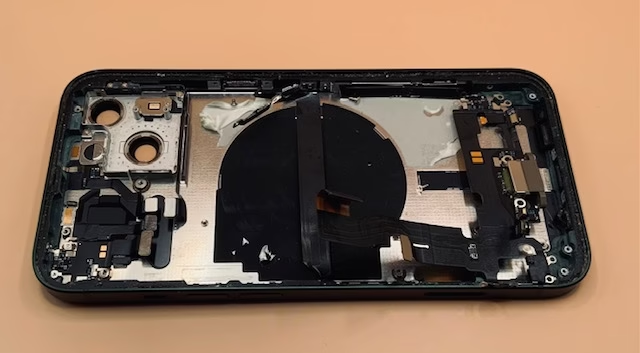
Your iPad Won’t Charge. And No… Wiggling the Cable Isn’t a Strategy.
If your iPad only charges when the cable is held at a certain angle or…

You’ve had your iPad plugged in since breakfast. It’s now dinner. Battery’s gone from 11% to… 12%.
At this rate, it’ll hit 100% sometime next month.
Before you lose your mind (or buy a new cable you don’t need), let’s talk about why your iPad is dragging its digital feet — and how to fix it without turning into a full-time detective.
Here’s the thing — iPads don’t age gracefully.
They get dusty, their ports loosen, their chargers wear out, and suddenly it takes longer to charge than it does to binge-watch a full Netflix series.
Sometimes it’s the power source. Sometimes it’s your cable.
And sometimes, it’s your iPad whispering, “I’m tired, Karen.”
Let’s narrow it down before you start shopping for a replacement you don’t actually need.
If you’re jamming the cable in at an angle just to get it to work — congratulations, it’s officially time for a cleaning.
You’d be shocked how many “charging issues” are just bad cables or underpowered adapters.
✅ Here’s what to check:
If your adapter’s old, frayed, or smells vaguely like melted plastic, replace it.
If you’re not sure, bring it by Barrie Screen Repair — we’ll test your charger for free before you waste money on the wrong fix.
Your iPad’s charging port is basically a lint magnet.
If it’s been near a hoodie pocket, purse, or gym bag, it’s probably housing enough fuzz to knit a sweater.
✅ Do this safely:
If you see corrosion (tiny green or white spots), that’s a moisture problem — and it needs professional cleaning fast.
Check out our charging-port repair page for what that process looks like (spoiler: we don’t use rice).
Some charging sins are slow killers.
Here are the biggest offenders:
And no, keeping it plugged in overnight every single night isn’t great either.
If your battery’s permanently stuck at 78%, it might just be time for a professional battery replacement.
Here’s your cheat sheet:
If it’s anything past “just the cable,” that’s your cue to stop guessing.
Our Barrie iPad repair team can diagnose it in minutes and tell you whether it’s a $30 cable fix or a $165+ soldering skills replacement level job.
Your iPad’s not sipping espresso — it’s trying to power a small spaceship. Give it a real charger.
If you’ve cleaned it, swapped cables, rebooted twice, and prayed to the tech gods but your iPad’s still charging like it’s in retirement mode, stop suffering.
Bring it to Barrie Screen Repair — we’ll test your charger, inspect your port, and get it charging like new again.
Most iPad charging issues can be fixed sin 1 – 3 days, so you’re not stuck watching your battery tick up one percent per hour.
👉 Book a diagnostic here — fast repairs, honest answers, no upsell nonsense.